Create custom nodes
Custom nodes allow you to write JavaScript code to:
- Create specialized functionality
- Process data in ways not covered by built-in nodes
- Integrate external libraries and APIs
Creating a custom node
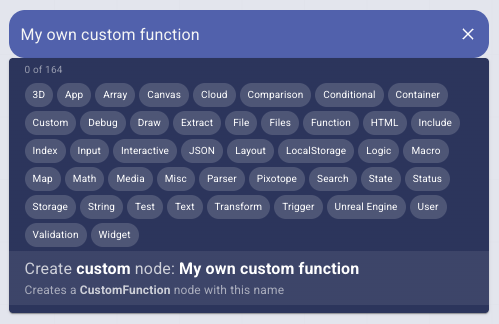
In the node search
- Search for the "Custom function" node and add it to the canvas
- Optionally - Rename it in the inspector
OR
- type your own custom name
- Select "Create custom node" from the search results
- A node with that name is created
Writing a custom function
Custom functions run in a QuickJS interpreter inside a browser worker by default.
Custom code cannot make network requests, load external scripts, access browser
databases or cache storage, or invoke macro(). Use the Main Thread option only
for trusted code that needs those capabilities. Existing worker functions that
use these APIs must be migrated to dedicated graph nodes or trusted main-thread
execution.
Workers and compiled functions are reused for repeated calls with unchanged code. The pool retains up to four idle workers. Each worker caches up to 32 functions in separate QuickJS contexts, sharing a 64 MiB guest-heap limit. Execution has a timeout and a stack limit; the browser worker can also be terminated if it hangs. These limits do not cap the browser's total memory usage. Inputs and results cross both a message channel and the interpreter boundary, so batching work helps.
Inputs and results support primitives (including undefined, NaN, infinity,
and bigint), arrays, and plain data objects. Cycles, more than 100 levels of
nesting, functions, and complex objects such as Date, Map, typed arrays,
and Blob are rejected rather than silently converted. Pass primitive data or
use Main Thread mode for those values. Standard JavaScript and self-contained
promises are supported; browser APIs such as fetch, setTimeout, and console
are not exposed. A promise that cannot settle without external work is rejected.
The code editor for custom nodes provides a JavaScript environment where you can:
- Select the node and open the inspector
- Write your function in the "Code" property
- For every input parameter, an input socket is automatically created
Basic Structure
- the function name/keyword can be omitted
- the function can be written as
- an arrow function
- OR a standard function
Learn more about how to write JavaScript functions
(inputA, inputB) => {
  // Your code here

  return inputA.valueX + inputB.valueY;
};
Example: Simple Math Function
function process(inputs) {
  const a = inputs.a || 0;
  const b = inputs.b || 0;

  const sum = a + b;
  const product = a * b;

  return {
    sum: sum,
    product: product,
  };
}
Execution Environment
Custom functions can run on the
-
Worker Thread (default): Runs JavaScript inside QuickJS, without browser APIs or app macros. Compiled functions are cached, with limits on guest memory, execution time, and stack size.
-
Main Thread: Runs with full access to the browser environment. This allows using browser APIs and DOM manipulation, but requires caution as it can block the UI if code is inefficient. A main-thread function also makes the whole app report Unrestricted access, because what it does cannot be listed in advance.
Toggle this option via the "Main Thread" property in the inspector panel:
// Worker Thread (safer, default)
(data) => {
  return data.map((item) => item * 2); // Safe data processing
};

// Main Thread (full access)
(data) => {
  document.title = 'Processing...'; // Can access DOM
  return data;
};